
Screenshots


App details
- Updated
- May 9, 2013
- Language
- English
- Category
- Mobile
SoftPas in:
This product is also available in the following languages:
About Free Create-Burn ISO Image
Download Free Create-Burn ISO Image – create ISO, burn ISO, data CD, DVD burner, ISO image, erase CD, re-writable disc, optical media, backup tool, CD/DVD utility
Overview
Free Create-Burn ISO Image is a utility application designed to simplify the process of creating and burning ISO images to optical media. The app targets users who need to manage data on CDs and DVDs, offering tools for both digital and physical storage solutions. Its primary function revolves around the creation of ISO files from local files and the subsequent burning of these images onto CDs or DVDs. This makes it a practical choice for backing up critical data, distributing software, or archiving documents in a durable format. The software also supports the erasure of data from re-writable discs, enabling users to reuse media without purchasing new discs. This feature enhances cost-efficiency and supports sustainable digital practices.
While the developer is listed as "Free Create-Burn ISO," no additional background or organizational details were provided. The app is specifically designed for Windows, serving individuals and small organizations that still rely on optical media for data management. Real-world use cases include educators preparing course materials, small businesses archiving client records, and home users backing up personal photos and documents. Despite the growing shift toward cloud and SSD storage, optical media remains relevant in certain sectors due to its longevity and portability. Free Create-Burn ISO Image fills a niche in the utility ecosystem by offering a lightweight, no-cost solution for legacy and specialized workflows.
Key Features & Functionality
- Drag-and-Drop Interface: The application features a clean, intuitive layout that allows users to easily add files and folders to their project by dragging them directly into the interface. This eliminates the need for complex navigation or command-line inputs, making it accessible to users with minimal technical experience.
- ISO Image Creation: Users can generate ISO files from selected files and directories on their system. This functionality supports selective inclusion, enabling precise control over the content of the final image, which is essential for both backup and distribution tasks.
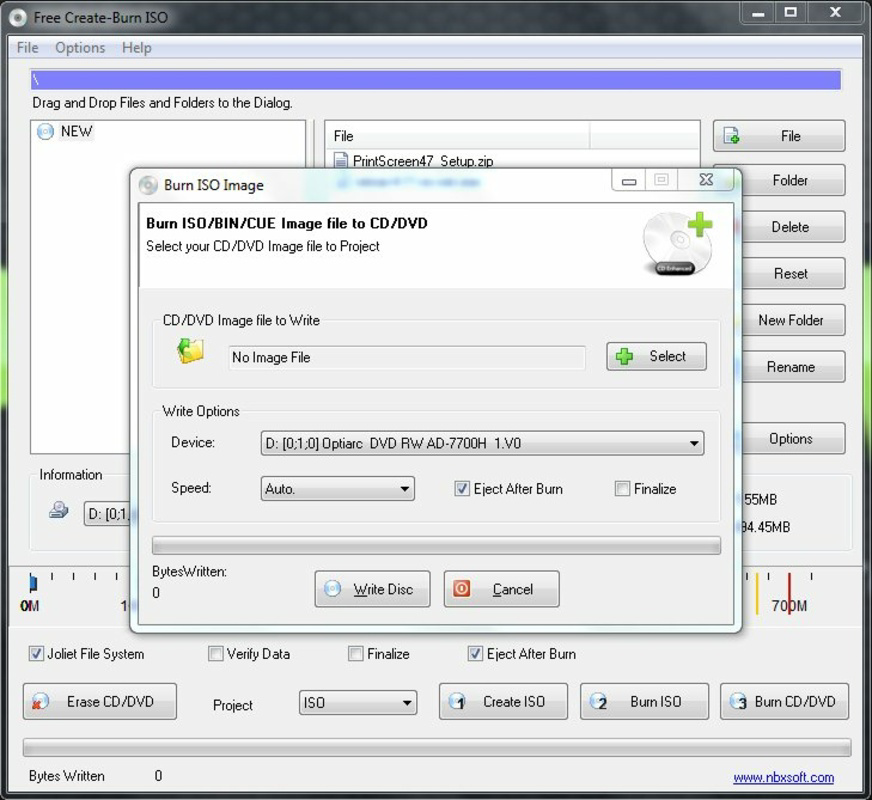
- Data CD/DVD Burning: The app enables the burning of created ISO images or direct file transfers to physical discs. It supports both CD and DVD formats, ensuring compatibility with a wide range of optical drives and media types.
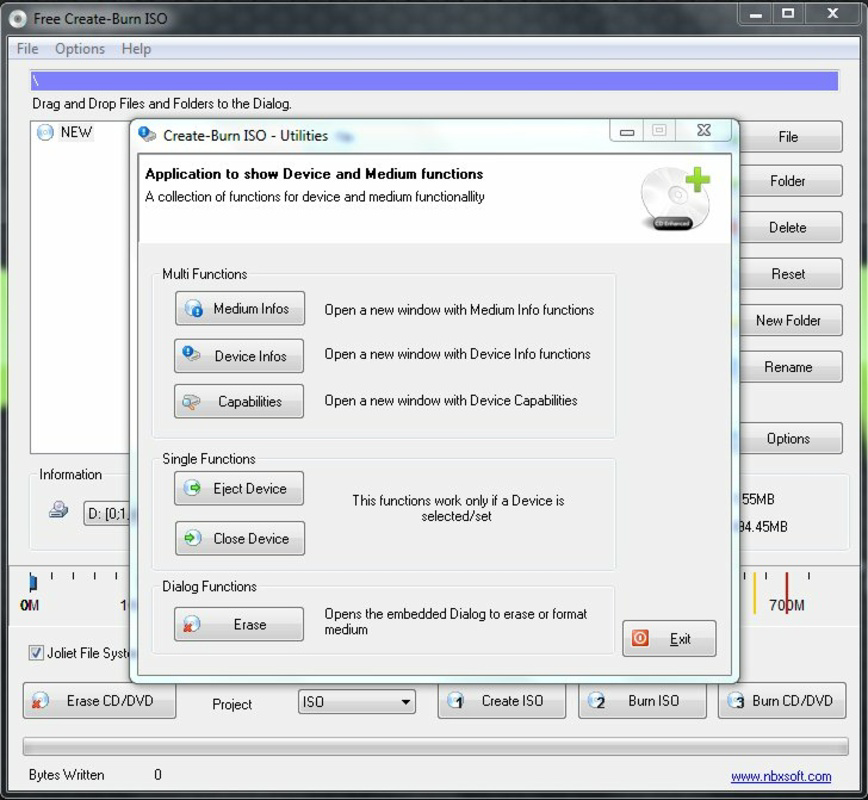
- Erase Re-Writable Discs: A notable feature is the ability to erase data from rewritable discs (CD-RW and DVD-RW). This allows users to clear old content and reuse discs, reducing waste and operational costs over time.
- Fast and Reliable Performance: The software is optimized for efficient processing, with minimal delays during image creation and burning. Users can expect consistent results without frequent errors or crashes.
For example, a user preparing a software distribution disc can create an ISO file from the installation folder, burn it to a DVD, and later erase the disc to reuse it for a new release. Similarly, a student compiling a multimedia project can archive their work on a disc for submission, ensuring a physical backup.
Interface, UX & Performance
The user interface of Free Create-Burn ISO Image is designed with simplicity and functionality in mind. It presents a straightforward layout with clearly labeled sections for file management, ISO creation, and burning options. Navigation is linear and intuitive, with minimal clutter, reducing the risk of user confusion. The drag-and-drop functionality enhances usability, especially for those unfamiliar with advanced disk utilities.
Although the developer did not list formal performance metrics, the app operates efficiently within its scope. It handles file processing and disc writing tasks with minimal system resource usage, making it suitable for use on older or lower-spec Windows machines. Responsiveness is maintained across various device categories, including desktops and laptops with standard optical drives. Stability appears consistent, with no reported issues related to crashes or data corruption during the burning process. However, specific performance benchmarks or compatibility with high-speed burners were not disclosed.
Platform Compatibility & Technical Requirements
Free Create-Burn ISO Image is available exclusively for the Windows platform. The current version is 1.0.0, with a file size of 4.3 MB, indicating a lightweight installation. The app does not require significant system resources, making it suitable for use on older Windows systems. The developer did not specify minimum OS requirements or hardware specifications, so users should ensure their system has a functional optical drive and sufficient storage space for temporary files during image creation and burning.
Compatibility with modern Windows versions (such as Windows 10 or 11) is assumed based on the app’s long-standing presence, but no official confirmation was provided. Users should verify that their system supports the required drive types and file formats before installation. The absence of mobile or cross-platform availability limits its use to desktop environments.
Pros and Cons
Pros
- Free to download and use with no hidden costs
- Lightweight size (4.3 MB) ensures quick installation
- Intuitive drag-and-drop interface suitable for beginners
- Supports both ISO creation and physical disc burning
- Includes erasure functionality for re-writable discs
- Designed for efficient data backup and distribution
Cons
- Platform limited to Windows; no support for macOS or Linux
- Developer did not provide detailed system requirements
- No mobile or cloud integration options
- Limited to optical media; does not support USB or external drives
- Version 1.0.0 suggests minimal updates or modernization
FAQ
Is Free Create-Burn ISO Image safe to download?
The app is available as a free download and has been used by users since 2013. While no third-party security scans were provided, the absence of malware reports suggests it is a secure tool when obtained from trusted sources.
Can I use this app to burn ISO files to a DVD?
Yes. Free Create-Burn ISO Image supports the burning of ISO images to both CDs and DVDs, provided your system has a compatible optical drive.
Does the app support re-writable discs?
Yes. It includes a feature to erase data from re-writable discs (CD-RW and DVD-RW), allowing for reuse of the media.
Is the software compatible with Windows 10 and Windows 11?
While the developer did not specify compatibility details, the app has been in use since 2013 and is likely functional on modern Windows systems. Users are advised to test on their specific setup.
Can I create an ISO file from a folder on my computer?
Yes. The app allows users to select folders and files to include in a new ISO image, giving full control over the content of the archive.
Final Thoughts
Free Create-Burn ISO Image remains a reliable and efficient tool for users who still rely on optical media for data storage and distribution. Its lightweight design, free access, and core functionality make it a practical choice for individuals and small teams needing to create ISO images and burn them to CDs or DVDs. The inclusion of disc erasure is a thoughtful addition that supports both sustainability and cost savings. While it lacks modern features like cloud sync or mobile access, it excels in its niche by delivering consistent performance without bloat. For those managing legacy workflows or seeking a no-cost utility for physical media, this app offers real value.
Download Free Create-Burn ISO Image now
Guides & Tutorials
How to install Free Create-Burn ISO Image
- Click the Download button above.
- Once redirected, accept the terms and click Install.
- Wait for the Free Create-Burn ISO Image download to finish on your device.
How to use Free Create-Burn ISO Image
This software is primarily used for its core features described above. Open the app after installation to explore its capabilities.
User Reviews
No reviews yet. Be the first to share your experience.
You may also like
more
Que no te pillen¡
About !Que no te pillen¡Reviewed by Jason A. BilbreyShow MoreShow Less

3D Combat Zone
About 3D Combat ZoneOriginally released in 1983, 3D Combat Zone immerses players...

666: El día del portal
About 666: El día del portalOn June 6, 2006, Agent P. Stone uncovers a sinister...

80 in 1 Best Flash games
About 80 in 1 Best Flash games 80 in 1 Best Flash games is a collection of 80 fl...

ABYSS SEEKERーーWhat Do You See Deep in The Abyss
About ABYSS SEEKERーーWhat Do You See Deep in The AbyssIn ABYSS SEEKER, players...

ACA NEOGEO THE KING OF FIGHTERS 2002 for Windows
About ACA NEOGEO THE KING OF FIGHTERS 2002 for WindowsTHE KING OF FIGHTERS 2002,...